Everything PewPreview does for a Cerakote shop.
One place to get customers, sell the job, run the shop and get paid. It brings the business to you, with the build spelled out, then makes the work way less time consuming.
Get customers
Direct, warm leads, with the full build spec.
Why it pays: a customer who has already seen their gun in the colours they want is not shopping around, and the build is written down before you pick up the phone. The two-colour job was sold before you said a word.
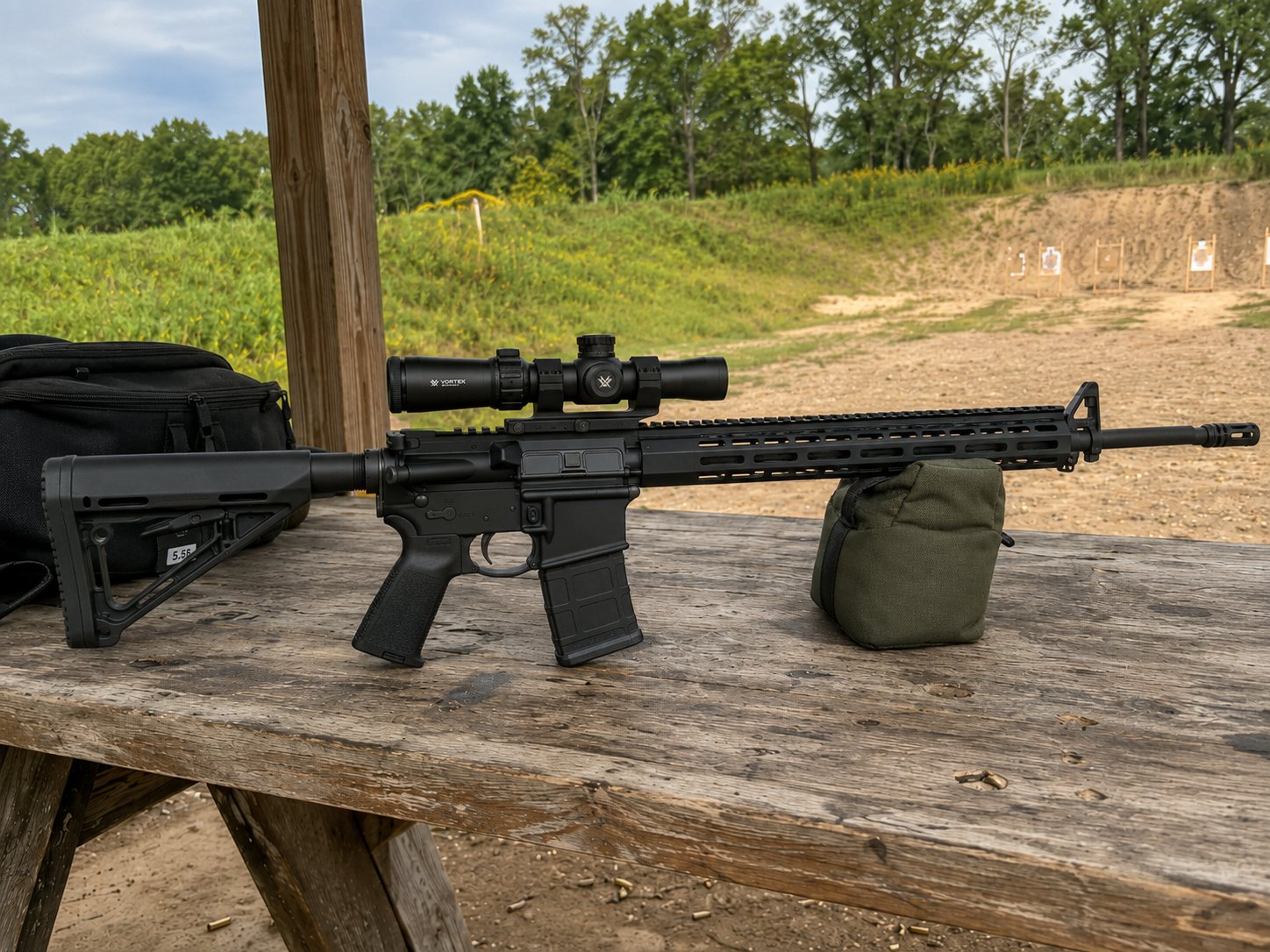
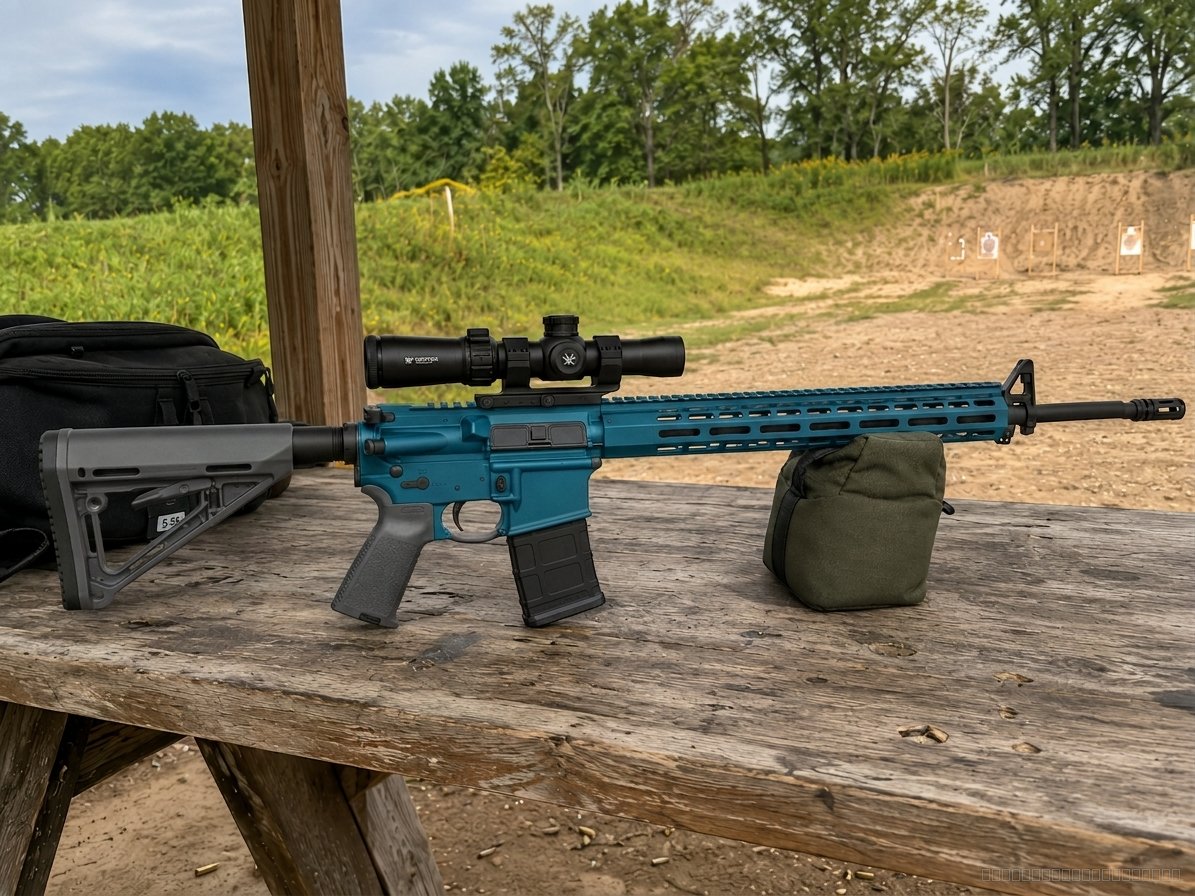
AR-15 · two colours
| Upper and lower | H-198 Aztec Teal |
| Handguard | H-198 Aztec Teal |
| Stock and grip | H-227 Tactical Grey |
| Barrel and muzzle | H-190 Armor Black |
| The picture | Approved by the customer · on their file |
The renders are the shop demo's own AR-15, made once through the live studio. The lead is an example: no real customer.
- The design studio on your own website, on a QR code at the counter, or from a link you text.
- Every design arrives as a lead: each part and colour by Cerakote code, the camo and its zone colours, the approved picture, their contact.
- Photoreal previews on a photo of the customer's own gun, in seconds. 100 a month on the plan.
- Upsells before you talk: camo with every zone's colour (Reptile Camo among them), shown on a gun of their platform before any render; their own pattern uploaded; and Surprise me, which proposes a whole job.
- Extras in plain words: "put an Aimpoint on it in H-199." Your colour choices always win.
- Find a Shop: a free listing with your Google rating; a customer near you sends their design to your shop.
- Leads waiting on a price sit on Today until you price them. Nothing goes cold in an inbox.
- Money from PewPreview, counted: Home shows what the customers your studio brought you have booked.
Shop tools
Your stencil files, from a picture. Built for Cerakote work.
Why it pays: hand-cutting a camo is the slow part of a camo job. Pew Stencil cuts it to a photo and a build: pieces sized to the real part, one sheet per colour, in the order you spray, ready for the cutter you already own.

The library's multi-terrain kit, cut for a rifle stock: 5 colours, 97 pieces on 10 twelve-inch sheets. The sheets above show that swatch's own pieces, traced colour by colour; the kit comes out as SVG and DXF for your cutter, with the placement guides.
- A camo kit from a photo of the gun and a picture of the camo: pick the parts on the gun's own picture, see the camo on them at the scale you choose, build.
- Cut files for the machine you own: SVG and DXF, one sheet per colour, for Graphtec, Silhouette, Cricut, LightBurn or EZCAD; split across the bed with registration marks.
- The part picked on the gun's own picture: the stock, the handguard, the scope, each at its real size from the 3D model; no measuring, no tracing.
- A library of 11 camo families ready to cut; scale said in inches; you pick the spray order.
- Placement guides as a PDF at 100% with crop marks and the spray order; every kit kept and tied to its job.
- Takedown, torque and parts for 200 firearms, matched to the gun on every job, with the shop tier and strip-and-rebuild minutes.
- Tips and tricks: 76 shop questions answered with Cerakote's own method, and 90 quick tips.
- The Cerakote estimator: how much a job takes, from what shops actually used; Cerakote on the shelf with a reorder list.
- Snap a photo on the phone straight onto the job; a before-and-after picture with your name on it.
- The counter form by QR code: the customer types their own name, contact and what they want.
Sell the job
A quote in a minute, not an evening.
Why it pays: everything you type once prices every quote after, so a quote is a check, not homework, and nothing is underpriced by guess.
- Your price sheet fills every quote and invoice line. Type a price once.
- The PewPreview standard price list and what shops across the country advertise, beside every box.
- Paste a customer's text or email and the quote is drafted for you to check.
- Quick quote on the phone: parts, colours, add-ons, your tax, the total out the door.
- Parts as Cerakote names them, the whole Cerakote catalog in the picker, camo by colour count, rush, deposit, your terms, your tax.
- Accepted online or signed at the counter with a finger; "They agreed, start the job now".
- Change orders, Customer backed out, and Quote this again on every gun you have coated.
Run the shop
Customers, jobs and the crew, organised and on schedule.
Why it pays: the first screen is the day's work, the bench runs off a sheet instead of memory, and the customer does their own typing and booking.
- Today opens on this month's calendar, in Google Calendar's shape, with a feed your Google Calendar can subscribe to, and the leads waiting.
- One file per customer: their quotes, jobs, designs, invoices and guns; two files for one person merge.
- Jobs on the bench: intake photos, a printed tag, a promised date, the status, closed out in one click; a test job deleted after a confirm.
- The job sheet and the spray list, printed: the build chart, the colours to mix, the masking list.
- Station timers by QR card; the week planned against each station's hours.
- Drop-off times customers book themselves; a gun taken in before it has a price.
- Crew logins with roles: owner, manager, front counter, bench. Each sees its own door.
- Settings in six short pages: your shop, quotes and invoices, messages to customers, getting paid, crew and the bench, plan and data.
- Contract and batch work for the dealer or the OEM, with costs per batch; Find anything in one box; an assistant that says where a thing is in your own words.
Money and delivery
Get paid, keep the customer told, prove your work.
Why it pays: the customer always knows where their gun is without you calling, the invoice looks like yours, and tax time is a download. PewPreview never touches the money.
- Invoices from the quote as agreed, your numbering and terms, your logo and colour, a PDF on every email.
- Pay links on every invoice and accepted quote: PayPal, Venmo, Cash App, Square, Stripe, Zelle, Clover, Shopify; or your own Stripe account for cards.
- A live status link for every job, a ready-for-pickup email, texting when you connect a number, a tracking number for mail-in work.
- Nothing goes out by itself. No email or text reaches a customer unless you press Send; "Don't send the customer anything" on any one job.
- The cure and QC log when you turn it on: coats, oven, cure, film thickness, a checklist with initials.
- Reports behind a PIN: booked, owed, paid, finished, by month; contract work per hour after costs.
- Everything for my accountant: one ZIP for a date range, seven spreadsheets; QuickBooks and Xero imports.
- The Google review ask at pickup, a before-and-after picture to post, a public gallery page for your shop.
Leads · quotes · jobs · stencils · invoices · the books
The customer's journey
From the idea to the pickup, in the order it really happens.
Customer designs the gun
On your site or at the counter: colours, camo, their own gun. It lands on their file as a lead.
You send the quote
Quick on the phone or full in the builder, from your price sheet. Accepted online or signed at the counter.
The gun comes in
They book the drop-off. Intake photos, a printed tag, a promised date on the calendar, the takedown guide.
Spray, stencil, log
The job sheet and spray list on the bench, the stencil kit cut, timers by QR card, the Cerakote logged.
Invoice, pickup, review
Ready-for-pickup sent, the invoice paid on your links, the review asked while the job is still warm.
The big picture
- Leads, customers, quotes, jobs and money in one system, instead of a phone, a notebook and a spreadsheet.
- Built for the one-man shop and the big one: roles for a crew, stations and timers, the week planned across them, contract and batch work for the dealer or the OEM.
- Simple by default: the first screen is the day's work; the tools are there when you reach for them.
- Your data is yours. No shop ever sees another shop's records. What every shop learns together comes back to all of them as a number, never as anyone's record: how much Cerakote a job takes, from what shops actually used; what the work sells for, from prices shops advertise.
What a shop asks first
Do I need a website?
No. The studio runs from a link you text or a QR code on the counter as well as from a line on your site. Find a Shop lists you either way.
Does PewPreview take a cut?
No. Customers pay you on your own pay links or your own Stripe account. PewPreview never holds the money.
What if the preview comes out wrong?
It gets a second pass. "Finish these parts" runs again from the same picture for one credit, refunded when nothing changed, and a preview that fails outright is not charged.
Do I have to change how I work?
No. Use the quote and skip the rest, or the whole thing. Nothing reaches a customer unless you press Send, and your terms and prices are your own.
How long does it take to set up?
An afternoon. Type your prices, put the studio on your site or print the counter code, invite your crew. The setup list on Today gets out of the way when it is done.
Can my guys use it?
Yes, with their own logins. Manager, front counter and bench each see their own door; the money and the settings stay the owner's.
What PewPreview will never do
- Touch your money. Customers pay you, on your own pay links or your own Stripe account. PewPreview takes no cut and holds nothing.
- Message a customer by itself. Nothing reaches a customer unless you press a button that says Send.
- Show another shop your data. Your customers, prices, leads and jobs are yours alone.
- Ask for a serial number. Make and model only, everywhere.
- Write your legal terms. The terms on your quotes are yours; PewPreview writes none.
- Hide what is not built. Every tool says in words whether it is live, in development, or planned.
What is next, honestly
These are not on the plan yet. They are named here so nobody waits on them by mistake.
- A free 3D builder Planned: try twenty looks on a generic model of the platform at the counter for nothing, then render the one they like on their own gun.
- Pew-Laser In development: a photo of the gun in, an engraving preview on that photo and the laser files out.
- Two-way Google Calendar sync Planned: today your Google Calendar can subscribe to the shop's dates; writing back is not built.
The plan
Everything on this page is on the one plan. No sales call, no contract, cancel anytime. Set up in an afternoon: type your prices, put the studio on your site, print the counter code.
One booked pistol covers two months.
Built in a real Cerakote shop. Still getting better.
I'm Tanner, owner of Fortress Cerakote in Idaho. I built PewPreview to solve headaches I deal with in my own shop. It's still growing, and you might run into a few rough edges. But I'm actively improving it, and the shops using it early get a say in what comes next. My goal is simple: make this thing earn its keep.
TannerOwner, Fortress Cerakote · Idaho